CSV Uploader Tool — Scaling Self-Service Data Import for Finance Teams
Role: Sole Product Designer — Research, Design, Handoff
Platform: B2B SaaS CRM for Private Equity & Venture Teams
Overview
At our B2B SaaS CRM, all of our teams migrated from Notion, Airtable, or Excel and needed a collaborative tool to manage their relationships and deal flow. Onboarding these clients initially required manual data implementation by our Customer Success team, creating a major bottleneck as our business scaled.
I led the design of a self-service CSV uploader tool, enabling clients to import contacts and deals independently while reducing strain on internal teams.
Strategic Challenge
We faced two competing priorities:
Scalability for the business: Manually “cleaning” and uploading data for each team was unsustainable for growth.
User control and accuracy: Clients wanted confidence that their data would be imported correctly.
Key decisions:
We chose to build a self-service tool because it addressed scaling bottlenecks and aligned with product strategy.
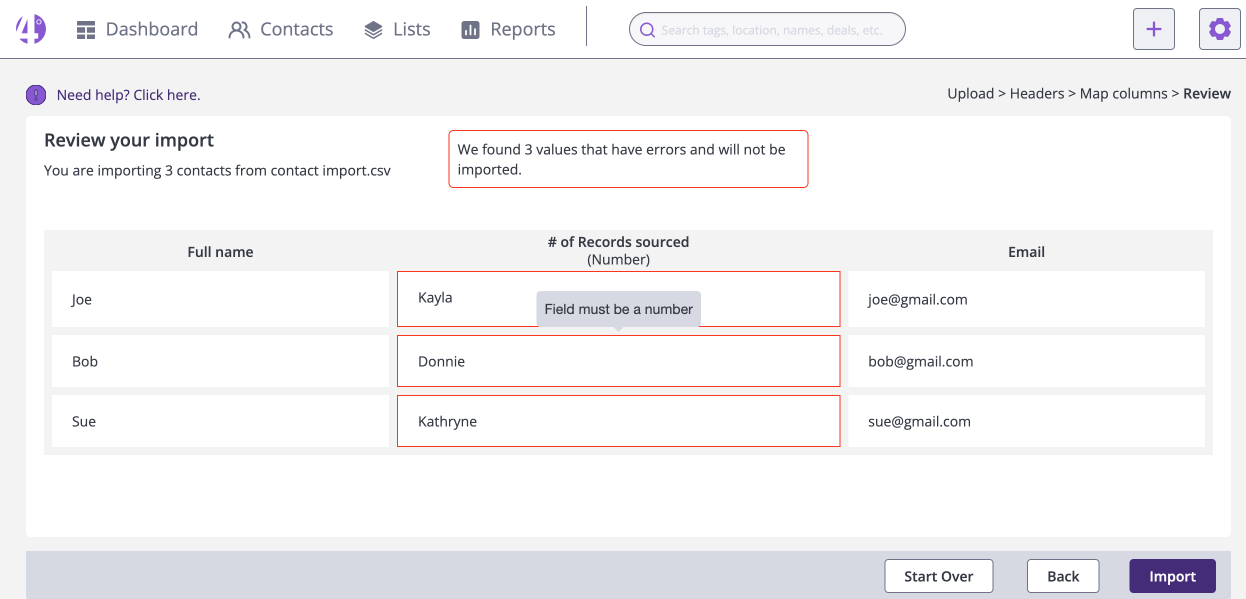
We avoided in-app editing and other engineering-heavy features due to engineering constraints, instead giving users guidance and feedback to correct their CSVs externally. This simplified implementation while keeping the tool maintainable.
Research & Collaboration
I joined Customer Success calls with new clients to observe pain points, including messy data and import frustrations.
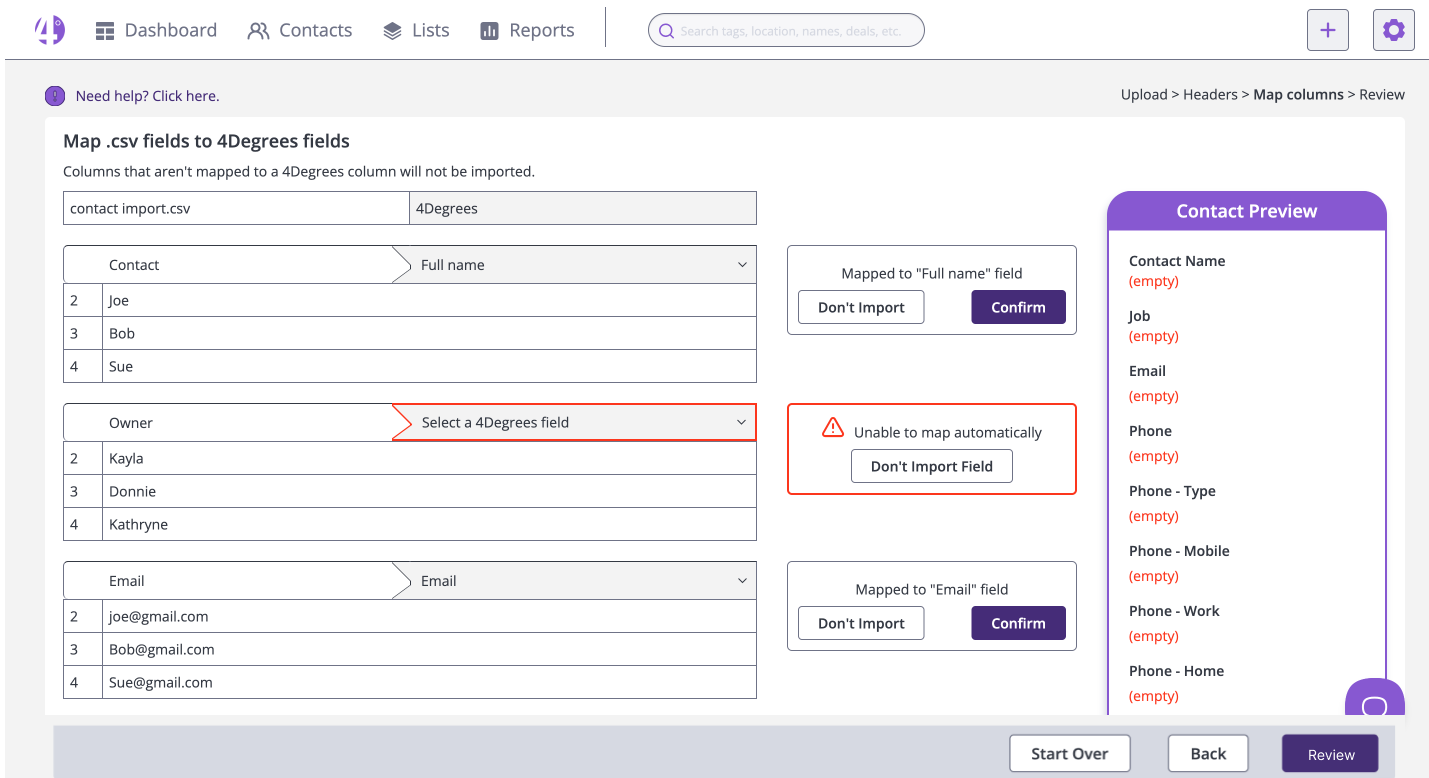
Collaborated closely with developers to iterate on technical constraints, including AI-assisted header mapping and error detection logic.
Navigated trade-offs between simplicity, maintainability, and user control, making design decisions that balanced business and user needs. (For users that wanted it, we offered a paid implementation service that included our customer service team working with their data hands on.)
Design & Workflow
I designed a workflow that guided the users through a tricky process and insured minimal importing mistakes:
Download template → Upload CSV → Identify header row → maps headers with AI assistance → Validation & duplicates check → Preview → Confirm import → Success/Error emailKey Features:
Downloadable Template: Ensured proper CSV formatting before upload.
AI-Powered Header Mapping: Reduced manual work and errors by automatically aligning headers with system fields.
Error & Duplicate Handling: Users could skip errors or re-upload corrected files, keeping the tool lightweight and maintainable.
Support Documentation: Detailed help articles guided users through edge cases, empowering them to confidently upload large datasets.
Constraints & Decisions
No formal testing: As a lean startup, we prioritized rapid MVP delivery and moved quickly between projects. Observing live Customer Success calls substituted for structured testing, giving us actionable insights.
Engineering constraints: Avoided building in-app editing; focused on preventing errors before import.
These decisions ensured the tool could scale with the business.
Impact & Outcomes
Drastically reduced the onboarding burden for Customer Success teams, freeing resources for high-touch support.
Enabled clients to import large datasets confidently, while maintaining data accuracy and reducing duplicates.
Balanced user empowerment, simplicity, and maintainability — a design that scaled with the company’s growth trajectory.
Reflection
Balancing business constraints, user needs, and engineering feasibility is critical in early-stage products.
Some users had a lot of anxiety about their data being “clean” so we still offered a paid hands-on implementation product for those teams.
Formal testing isn’t always feasible for small startups - instead we created a system of regular touchpoints and calls for users to share their feedback and sneak in short test sessions.
Designing scalable tools often means making intentional trade-offs, rather than adding every feature users might want.